


For valuable work on creation of sites you need a good comfortable editor necessarily. The world of internet is packed with several such editors which permit you to edit and compose websites and blogs in PHP, HTML, CSS and JavaScript. DreamWeaver and zend Studio are among the two hottest editors however sadly, these tools are costly and a website owner or blogger with low budget might unable to purchase these. In such a state of affairs, Codelobster is fully free PHP, HTML, CSS and JavaScript editor is that the most suitable option for editing and developing websites. We would friendly recomend this free of charge very
functional and at the same time of simple in the use editor - Codelobster PHP Edition .
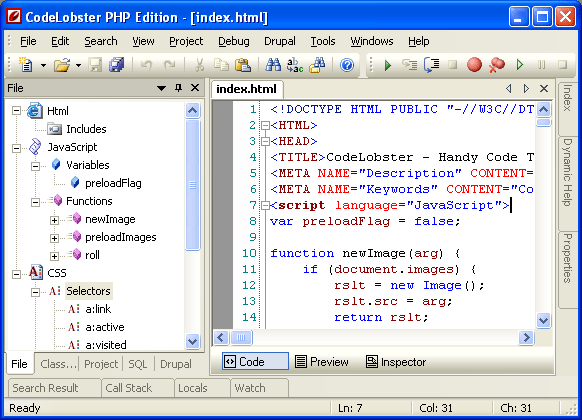
Here's the some important possibilities and advantages of this program:
- All code highlights depending on a type, the also mixed code is thus supported, so the area of HTML will be highlighted as HTML, PHP as PHP, and Javascript as Javascript in a the same file. For example, if a code piece has a mixture of PHP, HTML and CSS codes, then each type will be illuminated in a different color.
- Powerful autocompletion for HTML, PHP, CSS and Javascript, including HTML5 and CSS3. For PHP the structure of project is fully recognized, and the complete list of methods falls out in the proper places.
- HTML/CSS inspector on the type of Firebug, which allows easily to correlate the selected elements of page with a code and proper style.
- Context help on all supported languages. By pressing F1 key the page with detailed description for current tag, attribute or function will be opened.
- PHP debugger. PHP debugger allows to execute PHP scripts incrementally, watching the values of all variables in every line.
- SQL manager allows to produce all necessary actions with a database - to add, delete, edit a structure and records in tables, to export data, execute SQL queries. Highlighting and autocompletion works for SQL files also.
- Support of FTP If you don’t want to work with local files and want to edit your website directly on your server, the editor’s FTP support helps you in doing that seamlessly. You can edit files on a server directly without any difficulty.
- The portable option allows to use editor without the preliminary installation.
- Other useful utilities: pair highlighting, possibility of blocks selection, collapsing, tooltips, navigation on descriptions of functions and included files at withholding of the key of CTRL, viewing of structure of files and project, preview in a browser, book-marks, and all other standard possibilities for work with a code.
Also there are special plugins for work with
- CMS: Drupal, Joomla
- PHP frameworks: CakePHP, CodeIgniter, Symfony, Yii
- JavaScript libraly: JQuery
- WordPress blogging engine
- Smarty template engine
How to Download Codelobster PHP Edition on Your Computer
| Developer | Codelobster Software |
| Web Site | http://www.codelobster.com/ |
| Language | English, Russian, German, Spanish, French, Portuguese |
| Supported OS | Windows 2000, Windows XP, Windows Vista, Windows 7 |



 Hello! This is Adrian Lucernas, the owner and administrator of this blog, who lives in Camotes Island Cebu, Philippines. I have a pretty and loving wife Eljen Lucernas.


0 comments:
Post a Comment
Your feedback is always appreciated. We will try to reply to your queries as soon as time allows.
Note:
1. To add HTML code in comments then please use our HTML Encoder
2. For perfect customization of our tutorials, use our HTML Editor
3. Please do not spam, Spam comments will be deleted immediately upon our review.
Regards,
Adrian Lucernas